Warehouses and locations, goods receiving, guided put-away, route-optimised picking, batches and expiry dates, handheld stock counts and reordering based on actual consumption. Managers at the desk and operators with handhelds work on the same data, in real time.
Open-access demo, no sign-up: a fictional distributor with three ready-made roles.
magazzino.nixsa.app/demo
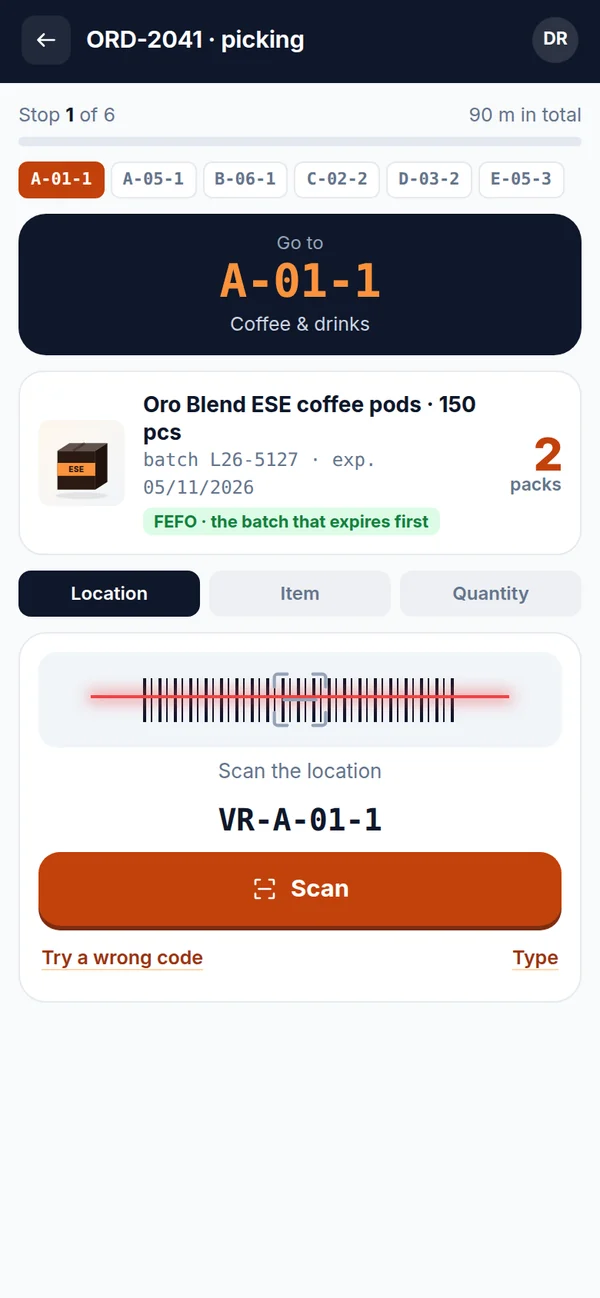
Location and item scanned, mistake caught
FEFO batch suggested automatically
Reordering based on consumption
Receiving
Put-away
Picking
Shipping
Stock counts
Reordering
The features at work
From the supplier's lorry to your customer, with no paperwork to retype
Every screen below is taken from the demo: you can open it and use it. Actions really move the stock and leave a trail in the log.
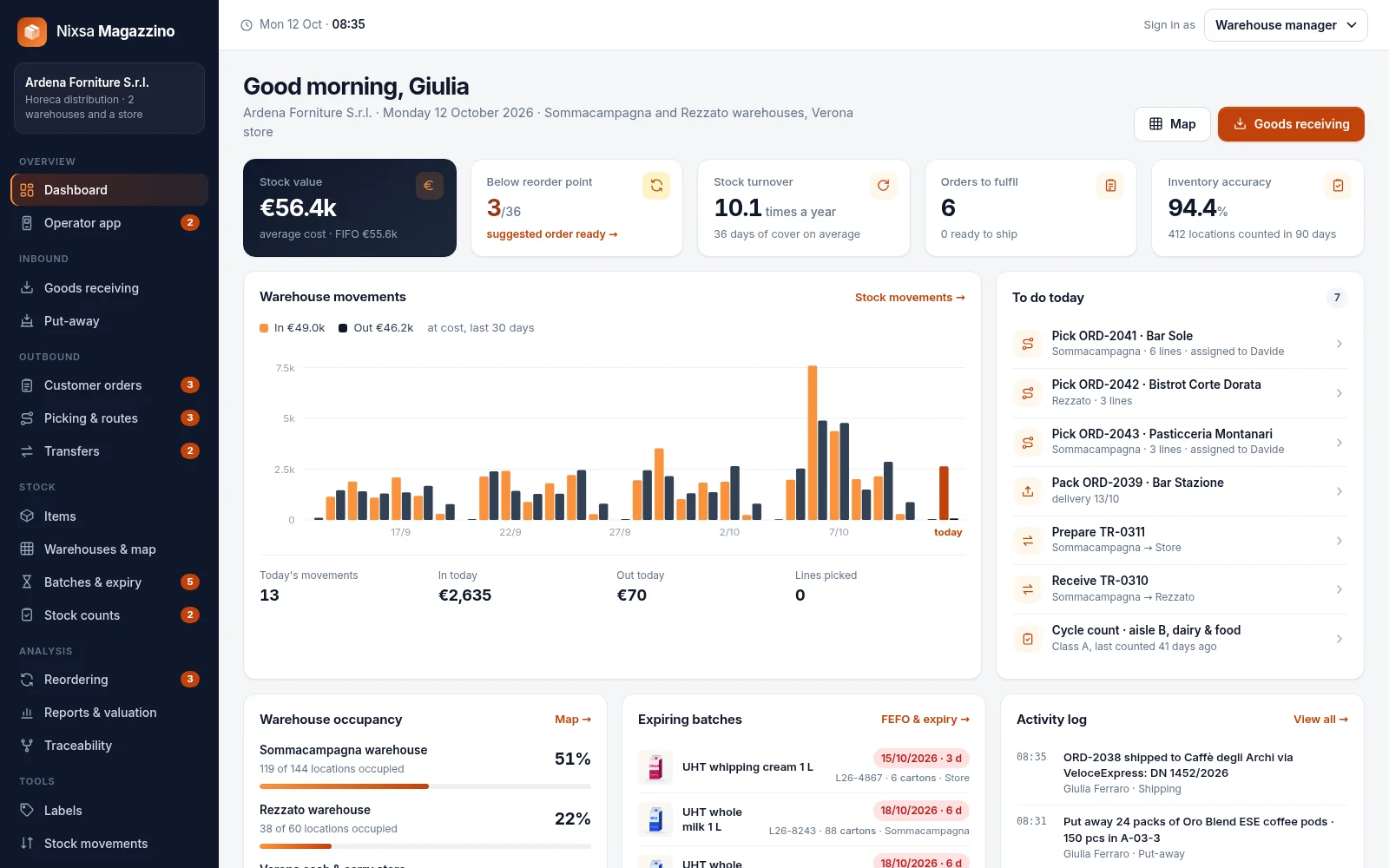
The dashboard: every site at a glance
Stock value at average cost and FIFO, items below reorder point, turnover and days of cover, orders to fulfil, inventory accuracy and the trend of goods in and out. Alongside, today's to-do list, in order of priority.
Indicators calculated in real time from stock movements
Expiring batches and warehouse occupancy always in view
Tamper-proof activity log: who did what, and when
Multiple warehouses, precise locations and a colour-coded map
Each site with its own aisles, racks and shelves. The map can be coloured by occupancy, category or expiry: you can see at once where there is space, where an item is and which racks should be cleared first.
Warehouses, stores, docks, quarantine and goods in transit
Real capacity of every location, calculated from item volumes
Transfers between sites with goods tracked all the way
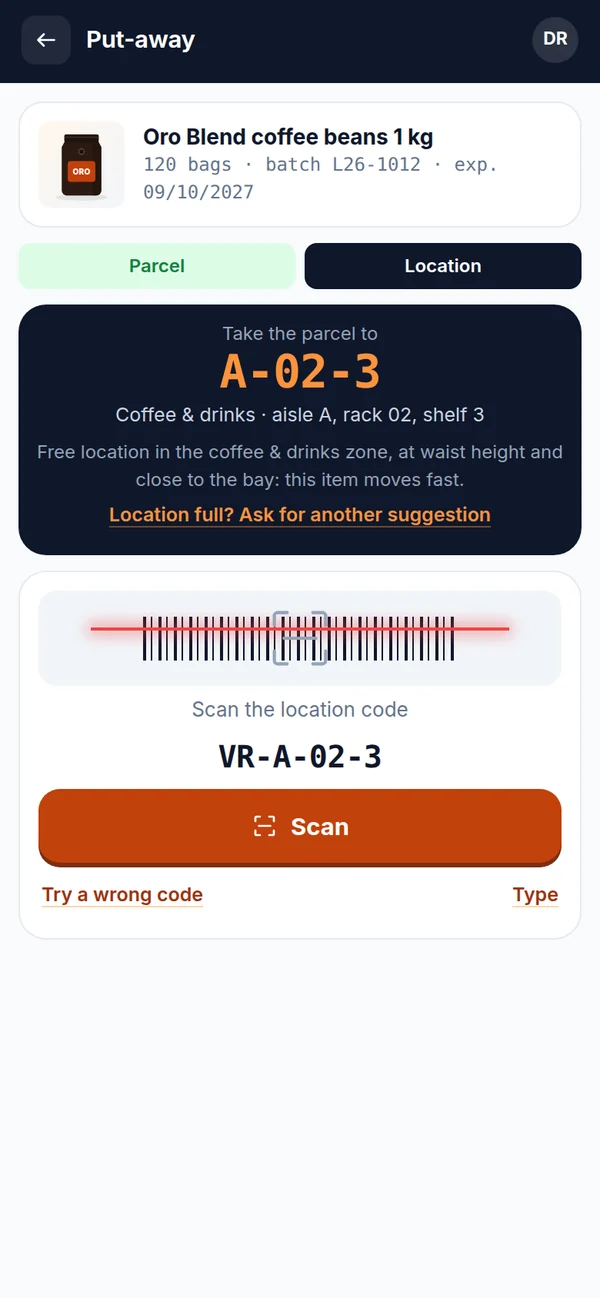
Receiving against the order, put-away to the suggested location
Goods are received against the purchase order: delivery note quantities are checked against what was ordered and any discrepancies are flagged. Scanning the GS1 labels fills in batches and expiry dates; the system then suggests where to put each parcel and the handheld confirms it.
Back orders kept open or closed line by line
Average cost updated with every delivery
Suggested location: same item, right zone, height based on turnover
Route-optimised picking, packing and shipping
Orders come in from sales agents, by phone or from the online shop. Picking follows a serpentine route that walks each aisle only once, taking the right batches; then packing with weights and parcel labels, delivery note and goods out of the warehouse.
Pick lists using FEFO or FIFO depending on the category
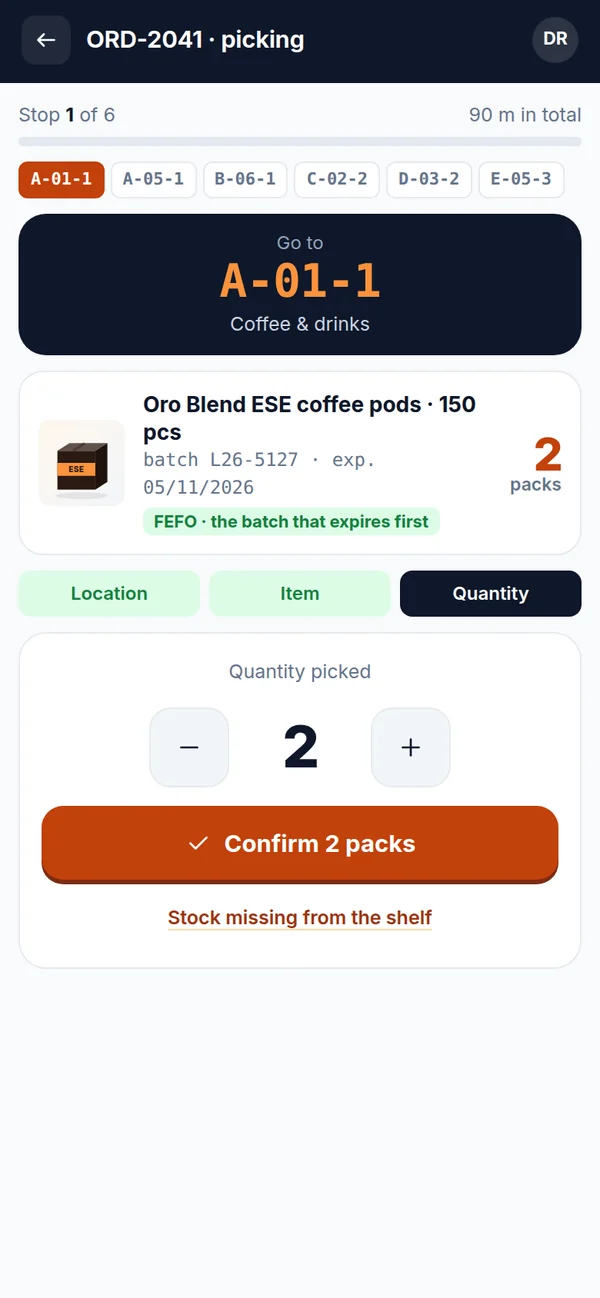
Shortages reported from the handheld trigger an automatic check count
Order status visible at every moment
Cycle counts and full stocktakes, with approved adjustments
Cycle counts follow the ABC class of each item; a full stocktake can be started whenever needed. Counting is blind, from the handheld; the system works out discrepancies and adjustments: below the threshold they are posted straight away, above it Management decides.
Only the location being counted is locked, the warehouse keeps working
Inventory accuracy measured count after count
Every adjustment stays in the stock movements log
Smart reordering, supplier by supplier
The reorder point is not a number typed in by hand: it is calculated from actual consumption, supplier lead times and demand variability. The order proposal is already grouped by supplier and rounded to the pack size.
Safety stock calculated, not guessed
Incoming goods and allocated orders taken into account
One click and the order goes to the supplier
Batches, expiry dates and FEFO
First expired, first out. Automatic alerts, expired batches blocked, transfers to the store suggested.
Forward and backward traceability
Where a batch came from, where it is now, which customers received it. One-click recall: stock blocked and customers to notify.
Barcode and QR labels
Items, locations, GS1 batches and outgoing parcels: real codes, readable by any scanner.
Reports and stock valuation
Weighted average cost and FIFO side by side, ABC analysis, turnover by category, slow-moving items. CSV export.
Complete item master data
Variants, batches, expiry dates, serial numbers, units of measure and pack sizes, photos, EAN codes: all in the item record.
Orders and stock movements
Every order with its status; every goods in, goods out, move and adjustment with author, time and document.
The operator app
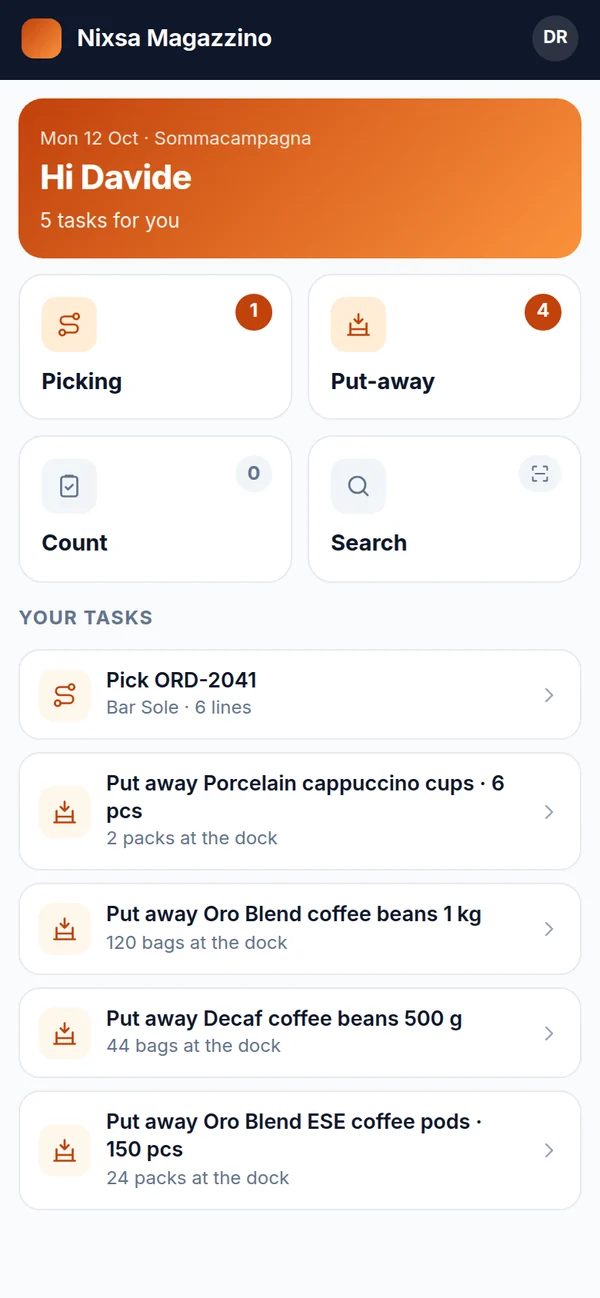
The warehouse in your hand, on a handheld or a phone
It runs on handheld terminals with a built-in scanner and on Android phones and iPhones, also with a Bluetooth scanner. Operators see only their own tasks, one at a time, and the system checks every step.
Mandatory scanning of location and item: pick the wrong thing and the handheld says so immediately.
Guided picking stop by stop, with the right batch and the quantity to take.
Confirmed put-away by scanning the label of the suggested rack.
Blind counting: whoever counts does not see the expected quantity.
Works offline and syncs when the signal comes back.
For businesses that need to receive, store and ship goods properly
From a small stockroom with a single operator to a network of warehouses with retail outlets: we start from the way you work today.
SMEs with a warehouse
Manufacturing and trading companies that want to know what they have, where it is and what it is worth, without spreadsheets to keep in sync.
Distributors and wholesalers
Many items, batches and expiry dates, several warehouses and deliveries every day: fast picking, FEFO and traceability for recalls.
E-commerce
Orders from the online shop, quick picking and packing, carrier labels and up-to-date availability on the website.
Service companies with stockrooms
Maintenance, installations, facility management, technical support: spare parts and materials in stockrooms and vans, with serial numbers and consumption per job site.
Configured for your business
It adapts to your warehouse, not the other way round
Nixsa Magazzino is configured and extended around your rules: locations, workflows, documents, roles and integrations with the systems you already use.
Online shop and marketplaces
Orders that come in automatically, availability and shipping status sent back to the website, for example with Shopify, WooCommerce or PrestaShop.
Accounting / ERP system
Master data, delivery notes, goods receipts and valuation exchanged with your ERP and e-invoicing.
Carriers
Consignment notes, parcel labels, pickup booking and tracking with the carriers you have contracts with.
Scanners and handhelds
Terminals with built-in scanners, Bluetooth scanners, company phones: barcodes, QR codes and GS1 labels.
Printers and scales
Thermal printers for item, location and parcel labels; connected scales for weighing at the packing stage.
Suppliers and customers
Purchase orders by e-mail or file exchange, confirmations and shipping notices, a portal for customers who want to see their orders.
Roles and approvals
Who sees what, who approves what, and with which thresholds: from warehouse staff to management, with every action logged.
Fields, workflows and documents
Item fields, order statuses, put-away and picking rules, label and document templates built around your needs.
Getting started
We start from your warehouse, not from a standard template
Timing depends on the number of sites, items and integrations: we agree it together after the initial analysis.
1
Analysis
We look at how you work today: sites, locations, items, documents, people and the systems to connect.
2
Configuration and data
We set up warehouses and locations, import master data and opening stock, and connect your systems.
3
Labels and training
We label racks and items, prepare the handhelds and train managers and operators on their own tasks.
4
Go-live and support
We start with an opening stock count and stay with you through the first weeks, fine-tuning whatever is needed.
Try the demo
Three roles, no sign-up
Ardena Forniture is a fictional distributor serving bars and restaurants, with two warehouses and a store. A five-step guided tour takes you from goods receiving to a stock count.